

Bag inserts and print
Every marketplace order that leaves your kitchen is a chance to say “order direct next time”. Flyers & QR makes print-ready bag inserts and flyers. Each print run (a “batch”) gets its own QR code, so you can see which marketplace’s customers came over and what they spent.
Before you start
Section titled “Before you start”- Flyers are part of the Growth and Pro plans (and the free trial).
- If you want a first-order discount on the flyer, create it first in Offers, for example the Bag-insert flyer code template.
Make a batch
Section titled “Make a batch”Go to Customers → Flyers & QR (also linked from Marketing).
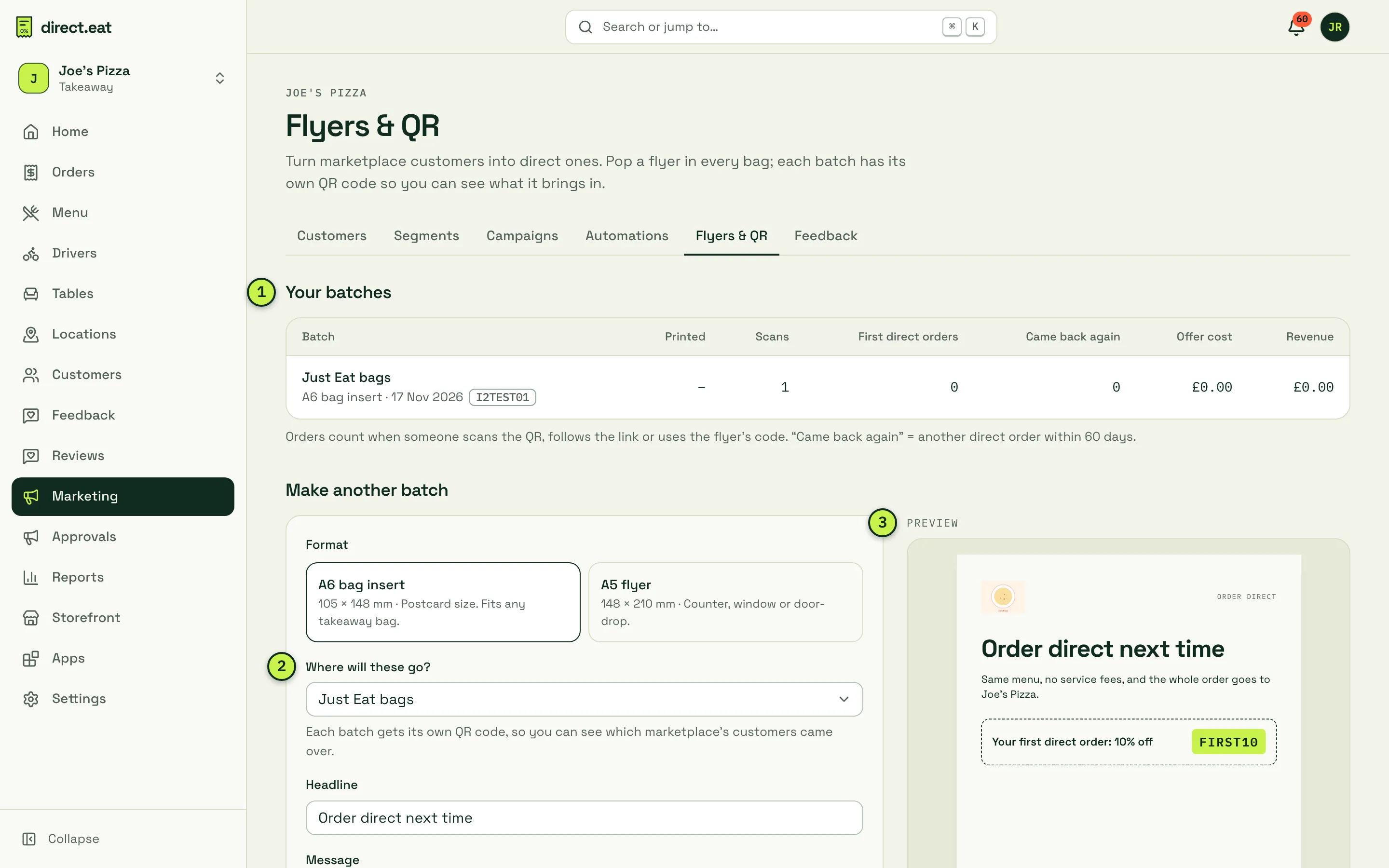
- Your batches: every print run with what it brought in (see below).
- Where will these go? Pick Just Eat bags, Deliveroo bags, Uber Eats bags, Your own bags, Door drop or Counter / window. This labels the batch so you can compare them.
- Preview: the flyer in your shop’s theme, updating as you type.
- Choose a Format: A6 bag insert (105 × 148 mm, postcard size, fits any takeaway bag) or A5 flyer (148 × 210 mm, for the counter, window or a door drop).
- Choose Where will these go?
- Write a Headline and Message. Keep it plain and true, and avoid prices: they go out of date.
- Optionally pick a First-order offer, the Code on the flyer and the Offer line customers will read.
- Enter How many will you print? and the Print cost (optional). These feed the conversion report.
- Click Create print-ready flyer.
Print it
Section titled “Print it”The batch opens a Ready to print page with the flyer at its exact size and a Print or save as PDF button.
- Choose Save as PDF in the print dialog to send it to a printer, or print at 100% scale (not “fit to page”).
- The coloured background runs 3 mm past the crop marks, so trimming leaves no white edges.
- The QR code is 30 mm wide on an A6 insert. Test it from about 30 cm away before printing a big run.
- Most UK online printers take the PDF as it is. Ask for 350gsm silk for bag inserts.
The QR code opens your storefront with the batch’s tracking code, for example joes-pizza.direct.eat/?src=bag-justeat&pb=…, so scans and first orders show up against that batch.
See what it brought in
Section titled “See what it brought in”The Your batches table shows, for each batch:
| Column | What it counts |
|---|---|
| Printed | The number you said you’d print |
| Scans | Times the QR code was scanned |
| First direct orders | First orders from people who scanned, followed the link or used the flyer’s code |
| Came back again | Of those, how many placed another direct order within 60 days |
| Offer cost | What the flyer’s discount cost you |
| Revenue | What those orders were worth |
Customers who came from a flyer also appear in the Marketplace converts segment, so you can thank them later with a campaign (if they’ve agreed to marketing).
Other ways to share your link
Section titled “Other ways to share your link”- Table and counter QR cards: see Table ordering.
- Your Google Business Profile “Order online” link and other launch ideas: see Go live.
- Single-use code sheets: an offer with codes can print an A4 sheet of QR codes from its page in Offers.
Related
Section titled “Related”Was this page helpful?