

Webhooks
Webhooks send an HTTPS POST to your server when something happens, such as a new order or an item being 86’d. Every message is signed, so you can prove it came from direct.eat. Zapier and Make can receive them too.
Before you start
Section titled “Before you start”- Owners and admins manage webhooks (permission
api.manage). - Webhooks need the Growth plan and above.
- Up to 10 endpoints per organisation. Endpoints belong to the organisation and receive events from all its shops.
Add an endpoint
Section titled “Add an endpoint”-
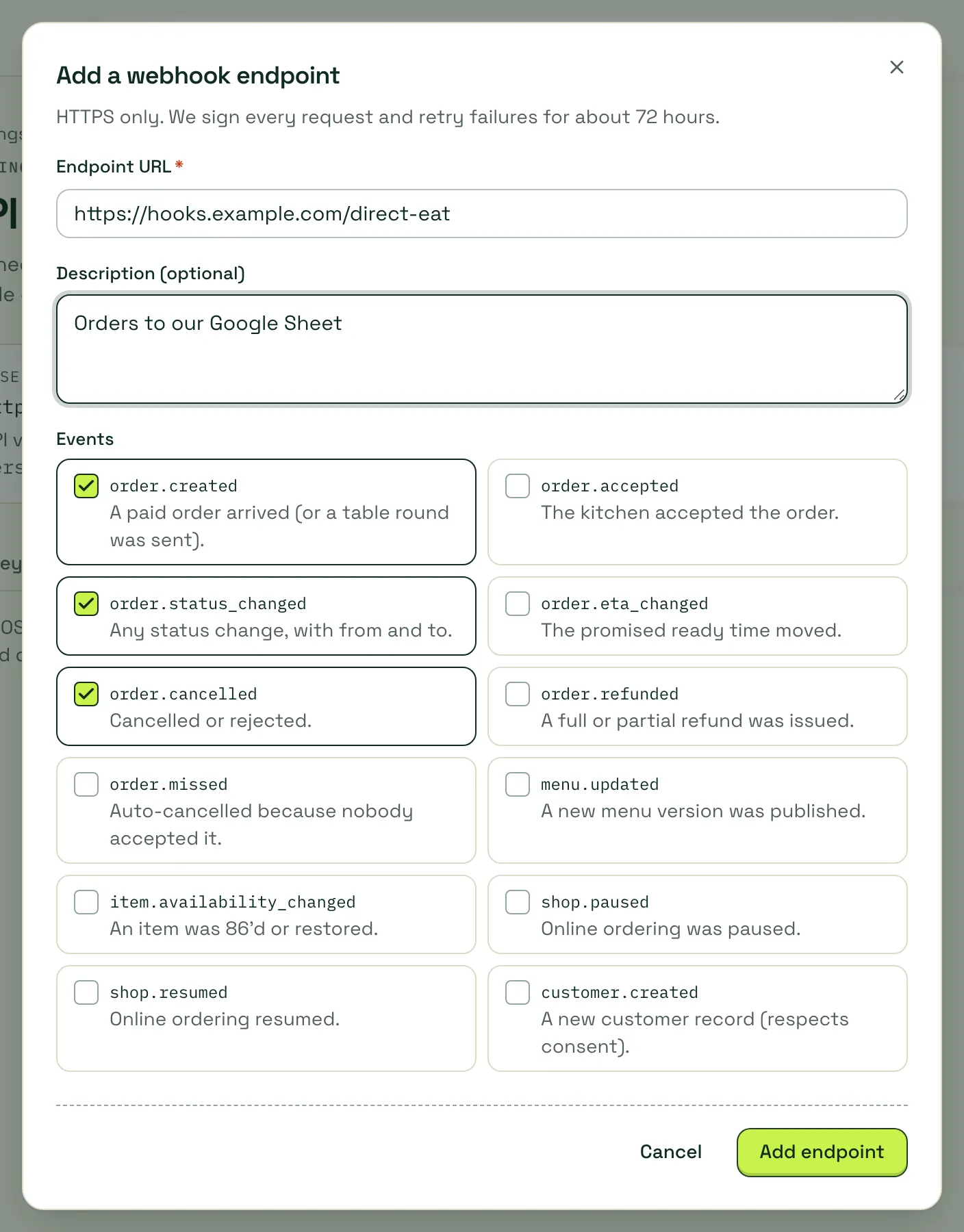
Go to Settings → API and webhooks and open the Webhooks tab.
-
Click Add endpoint.
-
Enter the Endpoint URL. It must be
https://, with a public host name: IP addresses,localhost, private networks and direct.eat’s own domains are refused. -
Optionally add a Description.
-
Tick the Events you want.
order.created,order.status_changedandorder.cancelledare ticked by default. -
Click Add endpoint.
Save the signing secret
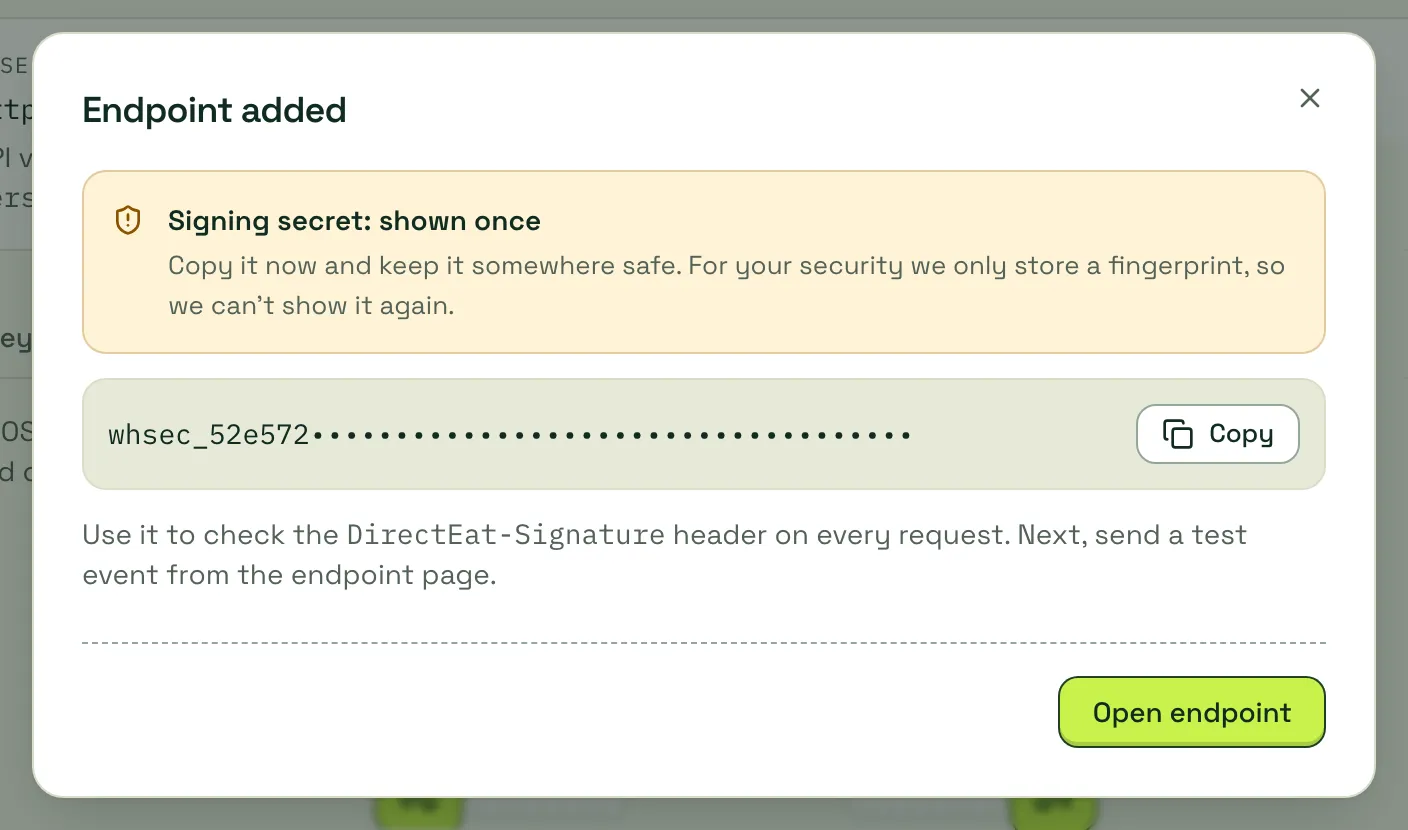
Section titled “Save the signing secret”The next screen shows the endpoint’s signing secret once. It starts with whsec_. Copy it into your server’s secret store; you need it to check signatures.
The endpoint page
Section titled “The endpoint page”Click Open endpoint (or the endpoint in the list) to manage it.
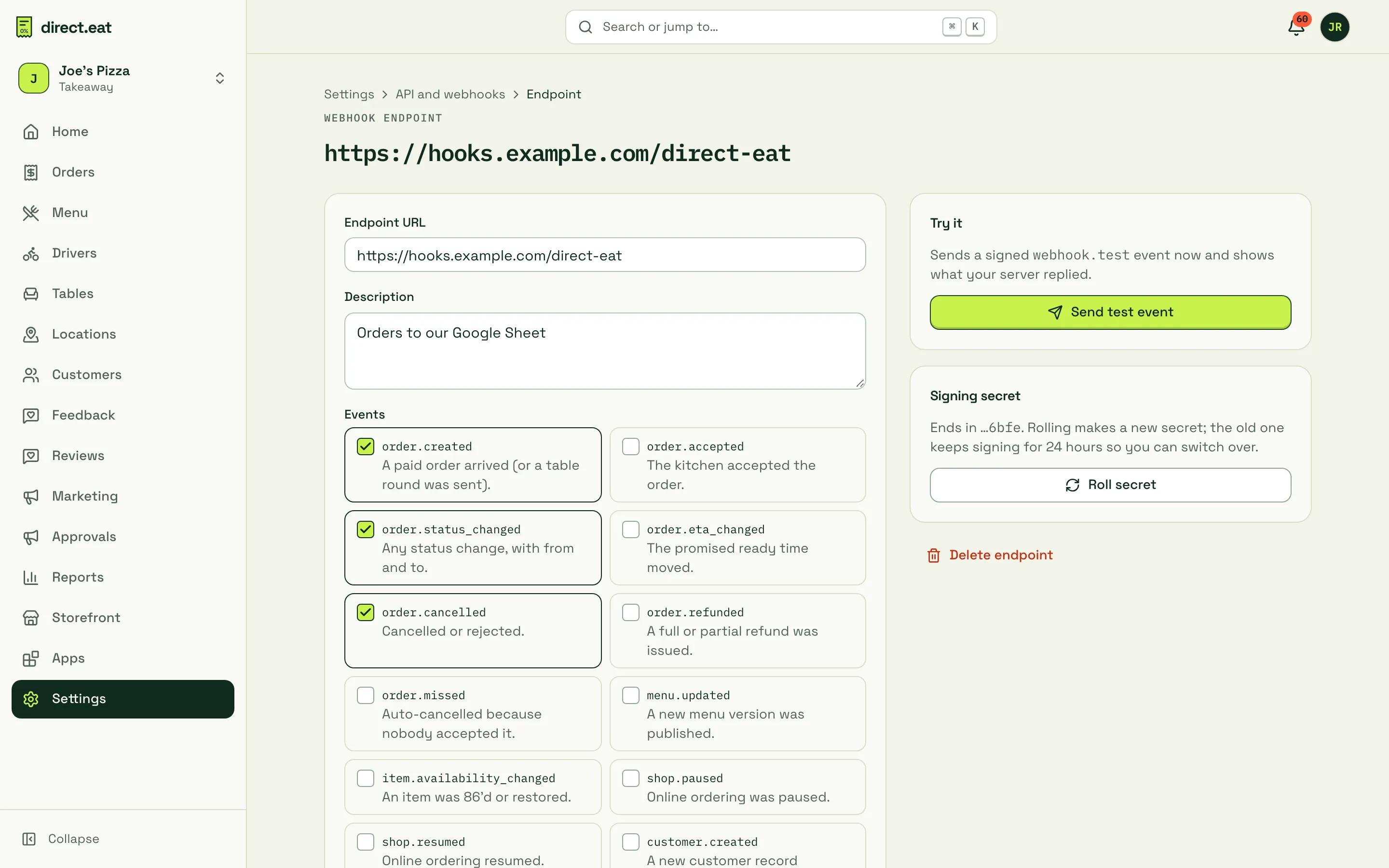
- Endpoint URL, Description, Events: change them and click Save changes.
- Send events to this endpoint: switch an endpoint off without deleting it.
- Send test event: sends a signed
webhook.testevent straight away and shows what your server replied. - Roll secret: makes a new secret, shown once. For 24 hours both secrets sign every request, so you can switch over without dropping messages.
- Delete endpoint: stops sending at once and deletes the delivery log.
Delivery log
Section titled “Delivery log”The Delivery log shows every delivery for the last 30 days: event type, status and HTTP code, event id, attempt number, response time, and when it was sent. Click a delivery to see the exact request body and your server’s response. Resend sends it again.
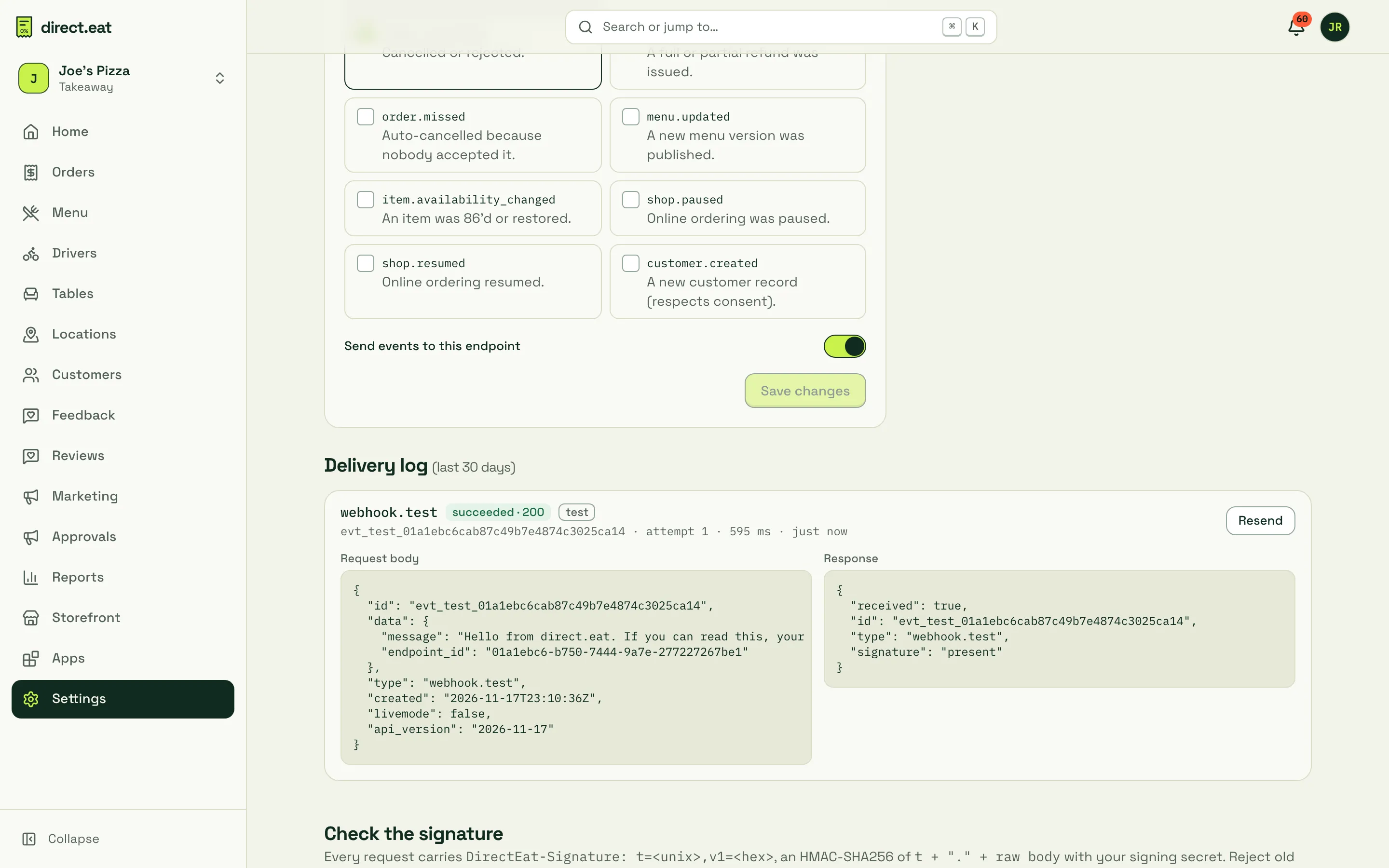
The page also shows ready-made signature checks in TypeScript and Python, the same as below.
Event types
Section titled “Event types”| Event | When |
|---|---|
order.created |
A paid order arrived (or a table round was sent) |
order.accepted |
The kitchen accepted the order |
order.status_changed |
Any status change, with from and to |
order.eta_changed |
The promised ready time moved |
order.cancelled |
Cancelled or rejected |
order.refunded |
A full or partial refund was issued |
order.missed |
Auto-cancelled because nobody accepted it |
menu.updated |
A new menu version was published |
item.availability_changed |
An item was 86’d or restored |
shop.paused |
Online ordering was paused |
shop.resumed |
Online ordering resumed |
customer.created |
A new customer record (respects consent) |
Some changes fire more than one event. Accepting an order sends order.accepted and order.status_changed; rejecting or cancelling sends order.cancelled and order.status_changed. Subscribe to the ones you need and de-duplicate on id.
Payload
Section titled “Payload”Every message is a JSON object:
{ "id": "evt_01a1ebc5e0c57565be5ba3124bd26b81", "type": "order.created", "created": "2026-11-17T23:09:36Z", "api_version": "2026-11-17", "shop_id": "20000000-0000-4000-8000-000000000001", "livemode": true, "data": { "order": { "id": "01a1ebc5-e057-761b-abaa-43ca2f7e257c", "object": "order", "number": 1930, "status": "new", "…": "…" }, "previous_status": "pending_payment" }}| Field | Meaning |
|---|---|
id |
Unique event id. Store it and ignore repeats |
type |
One of the event types above |
created |
When it happened (UTC) |
api_version |
The endpoint’s API version, also sent in the DirectEat-Version header |
shop_id |
The shop it happened at |
livemode |
false for test events |
data.order |
For order events: the full order, the same shape as GET /orders/{order_id} |
data.previous_status |
For status changes: the status before |
For menu, availability, shop and customer events, data holds that event’s details instead of an order.
Headers
Section titled “Headers”| Header | Value |
|---|---|
Content-Type |
application/json |
User-Agent |
direct.eat-webhooks/1.0 (+https://developers.direct.eat) |
DirectEat-Signature |
t=<unix seconds>,v1=<hex signature> (two v1= values during a secret roll) |
DirectEat-Event-Id |
The event id |
DirectEat-Version |
The API version |
Check the signature
Section titled “Check the signature”The signature is an HMAC-SHA256, using your signing secret as the key, of the timestamp, a full stop and the raw request body:
v1 = hex( HMAC_SHA256( secret, t + "." + raw_body ) )To check it:
- Read the raw body before parsing the JSON. Re-serialising changes the bytes and the check fails.
- Split the header on commas. Take
tand everyv1. - Reject the message if
tis more than 5 minutes from your clock. - Compute the HMAC and compare it to each
v1in constant time. Accept if any matches.
import crypto from "node:crypto";
// Use the raw request body (before JSON.parse).export function verifyDirectEat(rawBody: string, header: string, secret: string): boolean {  const parts = Object.fromEntries(header.split(",").map((p) => p.split("=") as [string, string]));  const t = Number(parts.t);  if (!t || Math.abs(Date.now() / 1000 - t) > 300) return false; // older than 5 minutes  const expected = crypto.createHmac("sha256", secret).update(`${t}.${rawBody}`).digest("hex");  // During a secret roll there are two v1 values; accept either.  return header.split(",").filter((p) => p.startsWith("v1=")).some((p) => {    const sig = Buffer.from(p.slice(3), "hex");    return sig.length === 32 && crypto.timingSafeEqual(sig, Buffer.from(expected, "hex"));  });}
With Express, keep the raw body:
import express from "express";
const app = express();app.post("/direct-eat", express.raw({ type: "application/json" }), (req, res) => {  const raw = req.body.toString("utf8");  if (!verifyDirectEat(raw, req.get("DirectEat-Signature") ?? "", process.env.DIRECTEAT_WEBHOOK_SECRET!)) {    return res.sendStatus(400);  }  const event = JSON.parse(raw);  res.sendStatus(200);          // reply fast…  queueForProcessing(event);    // …then do the slow work});
import hashlib, hmac, time
def verify_directeat(raw_body: bytes, header: str, secret: str) -> bool: parts = [p.split("=", 1) for p in header.split(",") if "=" in p] ts = next((v for k, v in parts if k == "t"), None) if not ts or abs(time.time() - int(ts)) > 300: # older than 5 minutes return False expected = hmac.new(secret.encode(), f"{ts}.".encode() + raw_body, hashlib.sha256).hexdigest() return any(hmac.compare_digest(v, expected) for k, v in parts if k == "v1")With Flask, use request.get_data() for the raw body:
from flask import Flask, request, abortimport json, os
app = Flask(__name__)
@app.post("/direct-eat")def direct_eat():    raw = request.get_data()    if not verify_directeat(raw, request.headers.get("DirectEat-Signature", ""), os.environ["DIRECTEAT_WEBHOOK_SECRET"]):        abort(400)    event = json.loads(raw)    # queue the event for processing, then reply    return "", 200
Reply quickly
Section titled “Reply quickly”- Reply with any 2xx status within 10 seconds. Anything else, a timeout or a connection error counts as a failure.
- Do the slow work after replying (queue the event).
- We never follow redirects. A
301or302counts as a failure. - Delivery is at least once: the same event can arrive twice. De-duplicate on
id. - Events can arrive out of order. Use
created, or fetch the order to get its current state.
Retries and auto-disable
Section titled “Retries and auto-disable”If a delivery fails, we retry the same bytes with a fresh signature:
| After failure | Wait |
|---|---|
| 1st | 1 minute |
| 2nd | 5 minutes |
| 3rd | 15 minutes |
| 4th | 1 hour |
| 5th and 6th | 4 hours |
| 7th and 8th | 5 hours |
| 9th to 16th | 6 hours |
That’s up to 17 attempts over about 67 hours. Test events and manual Resends are tried once, with no retries.
If an endpoint has been failing for 72 hours, it’s switched off automatically, pending deliveries are cancelled, and the owner and admins get an email (“Webhook endpoint disabled”) and a dashboard notification. The endpoint page shows a red banner with the last error. Fix your receiver, switch Send events to this endpoint back on, and use GET /events to catch up on anything you missed.
While an endpoint is failing, its page shows how many deliveries in a row have failed and since when.
Testing
Section titled “Testing”- Use Send test event on the endpoint page. The
webhook.testevent has"livemode": falseand a shortdatamessage. - Place a test order on your storefront to see real
order.createdand status events. - If you don’t have a server yet, a request-inspection service or a Zapier “Catch Hook” URL will show you the payloads.
Related
Section titled “Related”- API reference
- Errors and limits
- Integrations: Zapier and Make use webhooks.
Was this page helpful?