

Connect your own domain
Every shop gets a free, secure web address the moment it’s created: https://your-slug.direct.eat. You can also use a domain you own, such as www.yourrestaurant.co.uk or order.yourrestaurant.co.uk. It’s free on every plan, and the domain stays yours: we never register it for you or ask for your passwords. If you ever leave, you delete one record.
Before you start: only the owner or an admin can change domains. Managers can see the page and run the checker. You’ll need to be able to sign in wherever your domain’s DNS is managed (usually where you bought it: GoDaddy, 123-reg, IONOS, Namecheap, Cloudflare and so on).
Open Settings → Web address and domains.
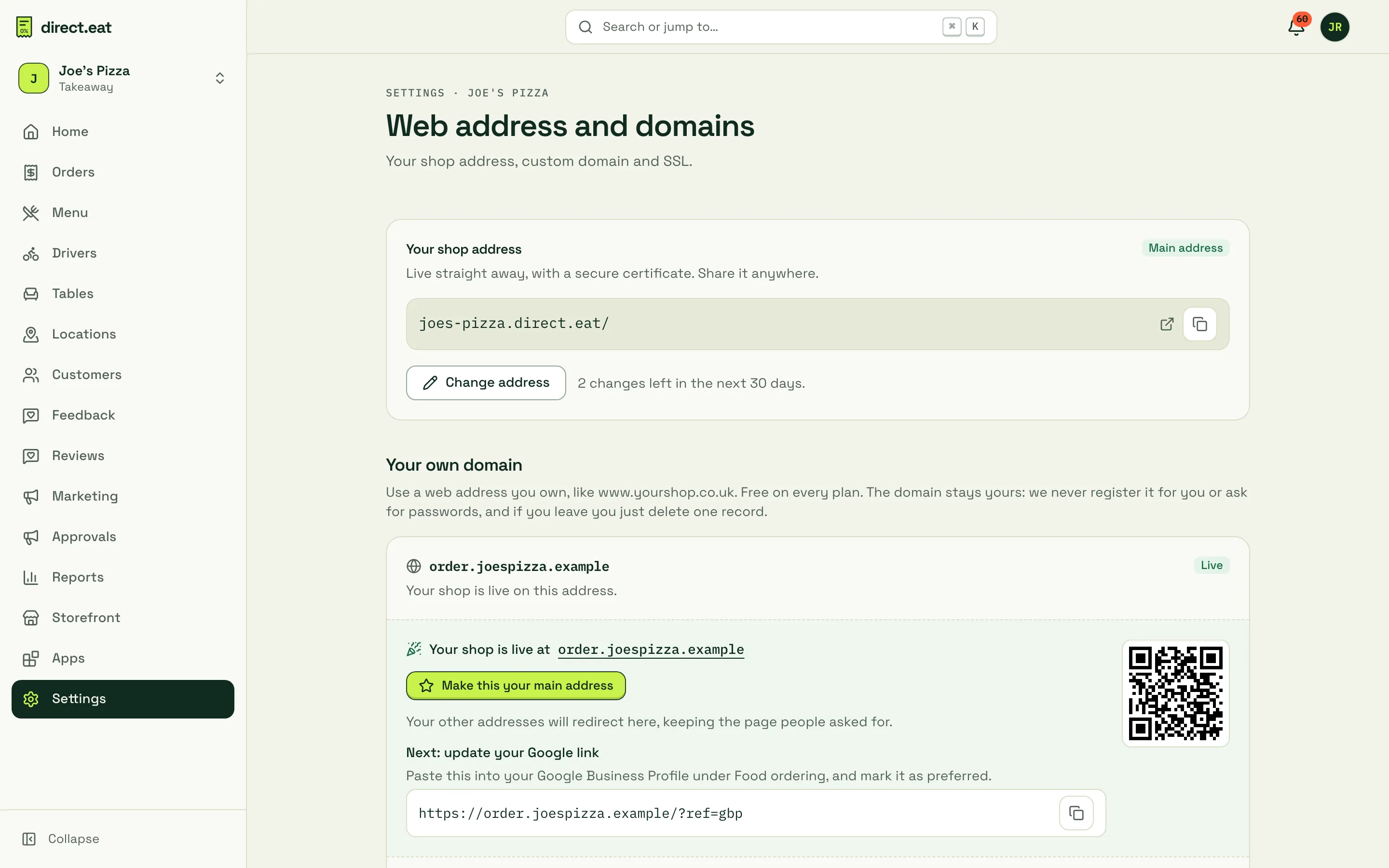
Your direct.eat address
Section titled “Your direct.eat address”The Your shop address card shows your-slug.direct.eat. It’s live straight away with a secure certificate, so you can share it anywhere, today.
To change it, click Change address. Addresses are 3 to 40 characters: lowercase letters, numbers and single hyphens. Some words are reserved (like www or admin) and big brand names are protected. You can change it twice in any 30 days. Your old address redirects to the new one for 12 months, and nobody else can take it in that time.
Which address should I use?
Section titled “Which address should I use?”| You have | Connect | Why |
|---|---|---|
| A domain with no website, or a website you’re happy to replace | www.yourrestaurant.co.uk |
Your ordering site becomes your website. |
| A website you want to keep (built on Wix, Squarespace, WordPress…) | order.yourrestaurant.co.uk |
Your website stays as it is. Add a big “Order online” button that links to it. |
Only the bare domain (yourrestaurant.co.uk) |
www plus forwarding |
Many providers can’t point a bare domain at another service. Connect www and forward the bare domain to it. See Bare domains. |
Connect your domain
Section titled “Connect your domain”-
Under Your own domain, click I have a domain (or Add another address if you already have one).
-
Type the address into Your domain, for example
order.yourrestaurant.co.uk. You can paste a full link; we tidy it up. -
Answer Do you already have a website on this domain?: No, use www or Yes, keep it (we’ll suggest
order.). -
Click Continue. If you typed a bare domain, we suggest the
wwwororderaddress instead, with Connect … or Use … anyway.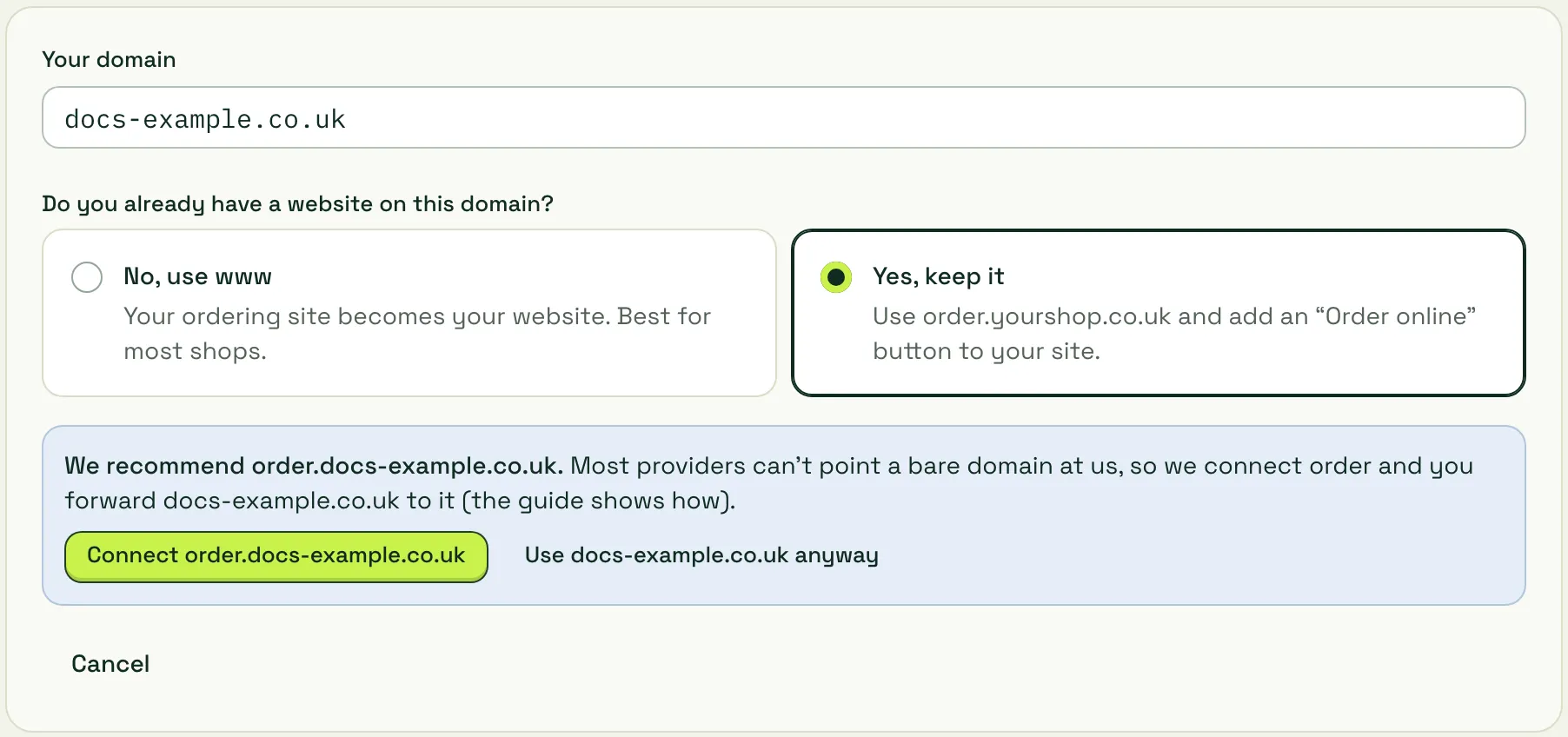
-
The domain appears with the status Add record and the one record to add.
Add the record at your DNS provider
Section titled “Add the record at your DNS provider”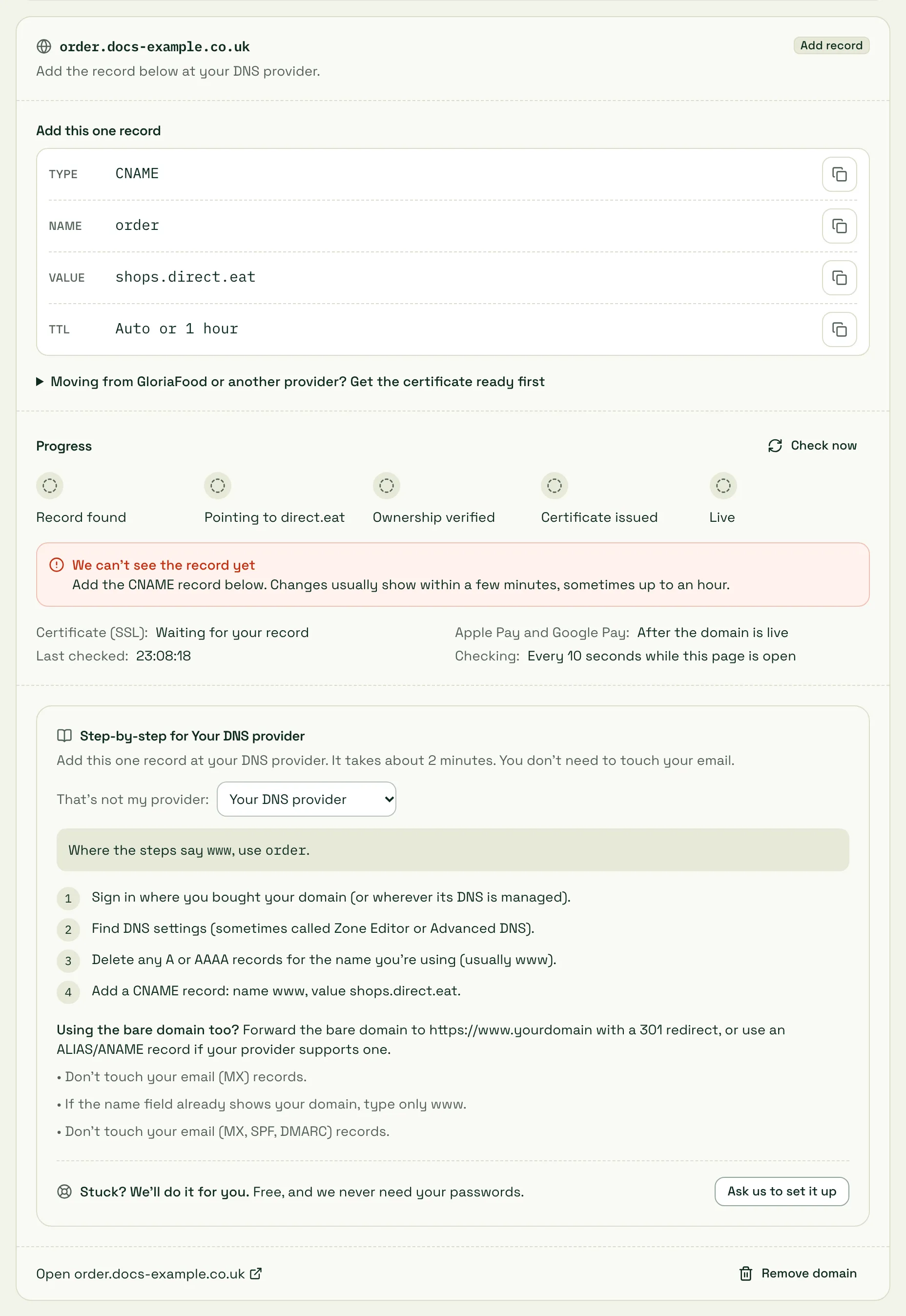
You add exactly one record:
| Type | Name | Value | TTL |
|---|---|---|---|
| CNAME | www (or order, or whatever comes before your domain) |
shops.direct.eat |
Auto, or 1 hour |
Each value has a copy button. The card also shows a Step-by-step guide for your provider. We detect who runs your DNS and open the right guide, marked Detected from your DNS. If we got it wrong, pick yours from That’s not my provider. There are full guides here too:
The in-app guides also cover Squarespace Domains (including former Google Domains), Wix, Fasthosts, Krystal and Heart Internet, plus a general guide for anyone else.
Watch it go live
Section titled “Watch it go live”The Progress tracker checks your DNS every 10 seconds while the page is open (for up to 30 minutes) and ticks off five steps:
- Record found: we can see a record for your address.
- Pointing to direct.eat: it points to
shops.direct.eat. - Ownership verified: your domain is confirmed as yours.
- Certificate issued: the padlock (SSL) certificate is ready.
- Live: your shop answers on the address.
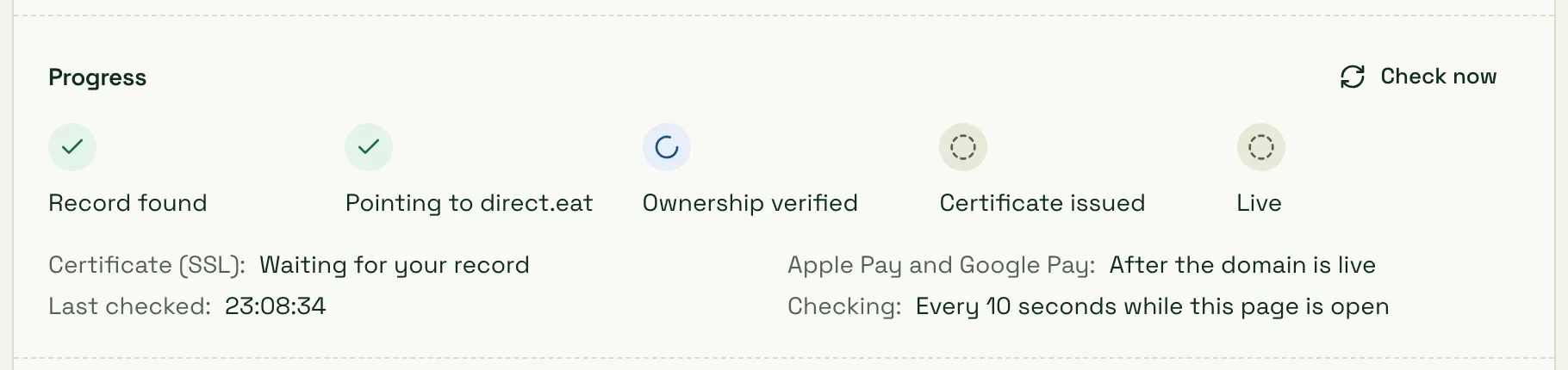
Click Check now to check straight away. DNS changes usually show within a few minutes, sometimes up to an hour. Occasionally a provider takes longer (up to 24 to 48 hours), especially if an old record had a long TTL.
If something’s wrong, the checker names it in plain English with the fix, for example “An old A record still exists on www” or “The record is proxied (orange cloud) in your Cloudflare account”. Every message and its fix is in Domain and SSL problems.
Statuses
Section titled “Statuses”| Status | What it means |
|---|---|
| Add record | Waiting for you to add the CNAME. |
| Checking | We can see your record and are confirming the domain. Usually under 5 minutes. |
| Securing | Ownership confirmed; the certificate is being issued. |
| Live | Your shop is live on this address. |
| Problem | Something changed with the domain. The card shows the cause and the fix. |
| Disconnected | Disconnected after 30 days of problems. Reconnect any time. |
| Removed | You removed it. Delete the CNAME at your provider when you’re ready. |
When it’s live
Section titled “When it’s live”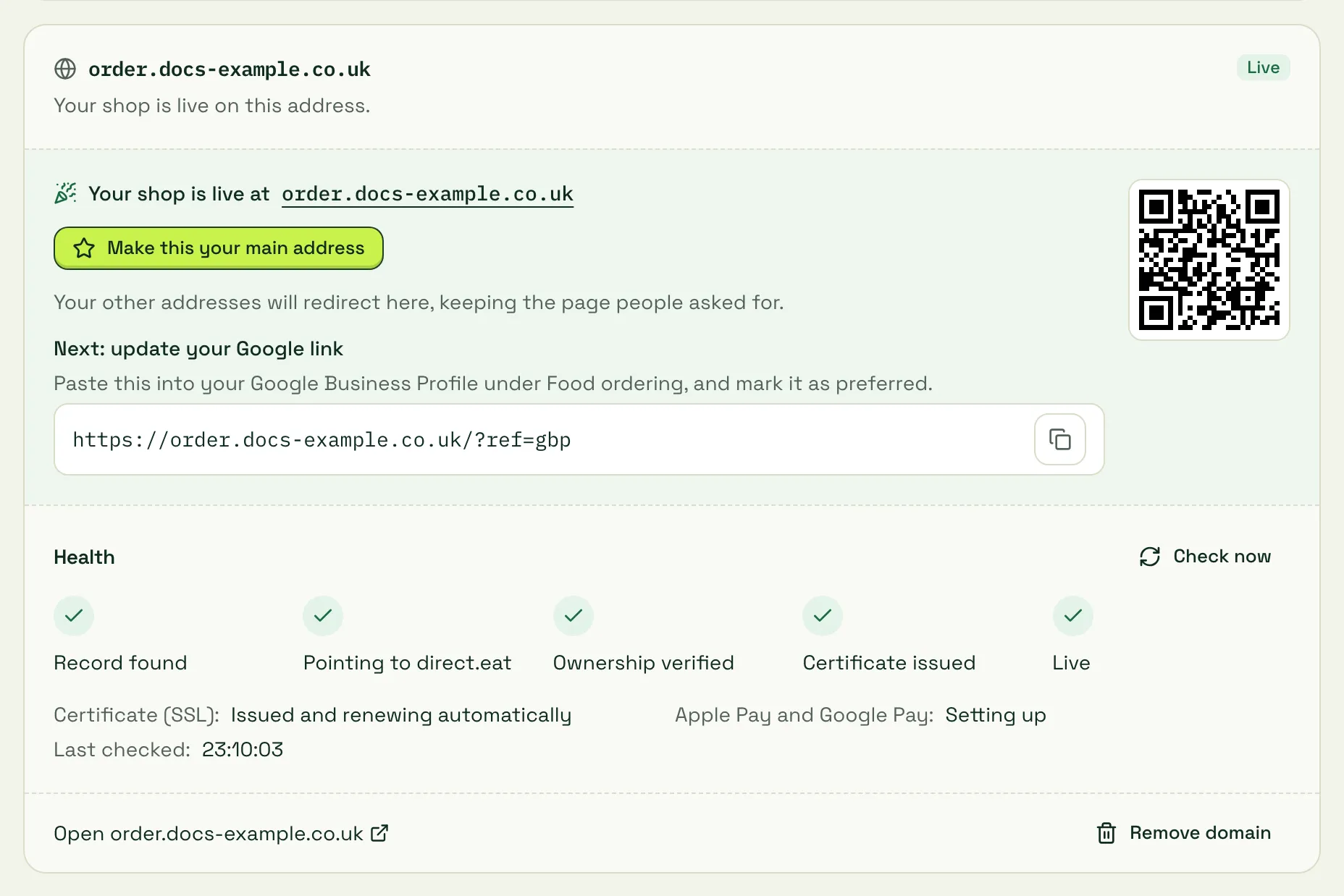
- Make this your main address: your main address is the one Google shows. Every other address (including
your-slug.direct.eat) redirects to it with a permanent (301) redirect and keeps the page people asked for. Order-tracking links already sent in emails and the Apple Pay check keep working on every address. - Update your Google link: copy the link (it ends
?ref=gbp, so orders from Google are counted) into your Google Business Profile under Food ordering, and mark it as preferred. See Go live. - QR code: for flyers, bags and table cards.
- Certificate (SSL): issued and renewed automatically. You never need to buy or install one.
- Apple Pay and Google Pay: the card shows whether they’re ready on the new address.
Bare domains (yourrestaurant.co.uk)
Section titled “Bare domains (yourrestaurant.co.uk)”A bare (apex or root) domain can’t normally have a CNAME record. You have two options:
- Your provider supports CNAME flattening, ALIAS or ANAME (Cloudflare does it automatically, Namecheap has ALIAS records): add the record at
@pointing toshops.direct.eat, and add the bare domain as a second address. It then redirects to your main address. - Everyone else (GoDaddy, 123-reg, IONOS and most UK registrars): connect
www, then use your registrar’s domain forwarding to sendyourrestaurant.co.uktohttps://www.yourrestaurant.co.ukwith a permanent (301) redirect. Each registrar guide shows where.
If you add a bare domain anyway, the card reminds you that only some providers allow it.
Moving from GloriaFood or another platform without downtime
Section titled “Moving from GloriaFood or another platform without downtime”If your domain already points at your old ordering provider, you can get the certificate ready before you switch, so there’s no gap with a security warning.
Open Moving from GloriaFood or another provider? Get the certificate ready first on the domain card. It shows two TXT records:
| Type | Name | Value |
|---|---|---|
| TXT | _cf-custom-hostname.order.yourrestaurant.co.uk |
the value shown on your card |
| TXT | _acme-challenge.order.yourrestaurant.co.uk |
the value shown on your card |
Add both at your DNS provider and wait for Ownership verified and Certificate issued. Then change the CNAME to shops.direct.eat. Most providers add your domain to the name for you, so you’d type only _cf-custom-hostname.order and _acme-challenge.order.
“Please prove you own this domain”
Section titled ““Please prove you own this domain””If a domain was connected to a different direct.eat account in the last 90 days, you must add a TXT ownership record before it can go live, even if the CNAME is right. This stops someone taking over a domain that used to belong to another restaurant. The card shows the exact TXT record (name and value) in a yellow box.
Stuck? We’ll do it for you
Section titled “Stuck? We’ll do it for you”At the bottom of every guide, click Ask us to set it up. It’s free, and we never need your passwords.
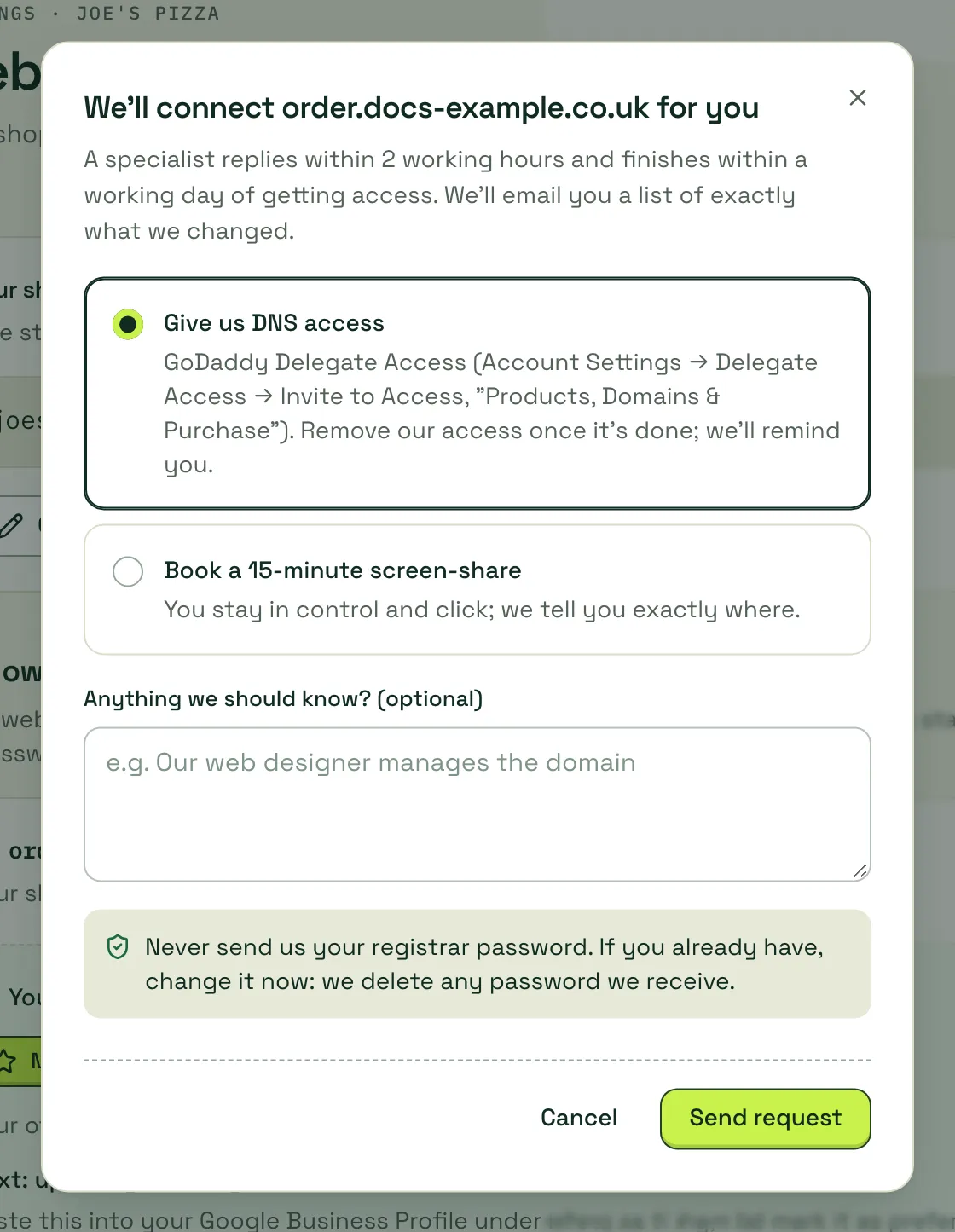
- Give us DNS access: most providers let you invite someone with limited access (GoDaddy Delegate Access, Namecheap Share access, a Cloudflare member with the DNS role, an IONOS user with DNS permissions). Remove our access once it’s done.
- Book a 15-minute screen-share: you stay in control and click; we tell you exactly where.
A specialist replies within 2 working hours and finishes within a working day of getting access, and we email you a list of exactly what we changed. Your request shows on the card with its status. Never send us your registrar password: if you already have, change it now. We delete any password we receive.
Remove a domain
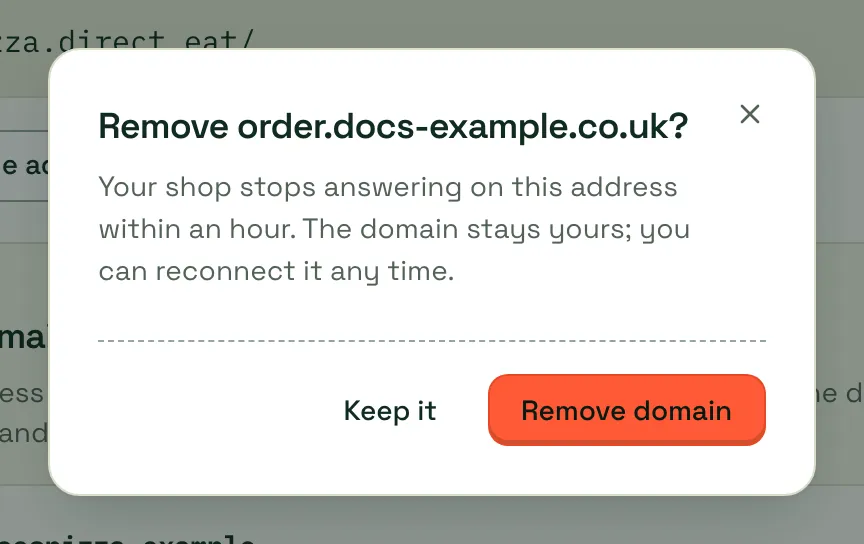
Section titled “Remove a domain”Click Remove domain on the card and confirm. Your shop stops answering on that address within an hour. If it was your main address, your-slug.direct.eat becomes your main address again. Then delete the CNAME record at your DNS provider. Nothing else needs to change, and you can reconnect any time.
If your domain lapses or moves
Section titled “If your domain lapses or moves”If your domain expires, or someone changes the DNS so it no longer points at us, the address stops working and the card shows Problem with the cause. Renew the domain or put the record back and click Check now. Customers can always reach you on your-slug.direct.eat.
Related
Section titled “Related”Was this page helpful?