

Approvals
Managers can draft offers, loyalty changes, gift card settings, campaigns and automations, but nothing that costs you money goes live until an owner or admin says yes. direct.eat support can draft for you, but can never approve.
Who does what
Section titled “Who does what”| Role | Approvals |
|---|---|
| Owner | Sees and decides every request, including owner-only ones |
| Admin | Sees and decides requests, except owner-only ones |
| Manager | Sends requests and follows their progress. Can withdraw a request that’s still waiting. Can’t approve |
| Staff | No access |
Some requests are marked Owner only. An offer needs the owner when its worst-case cost is over £500, or its discount is bigger than 50%. These are the defaults for every organisation.
Find your approvals
Section titled “Find your approvals”Click Approvals in the sidebar (or press G then A). It also appears as a tab in Marketing, with a count of what’s waiting.
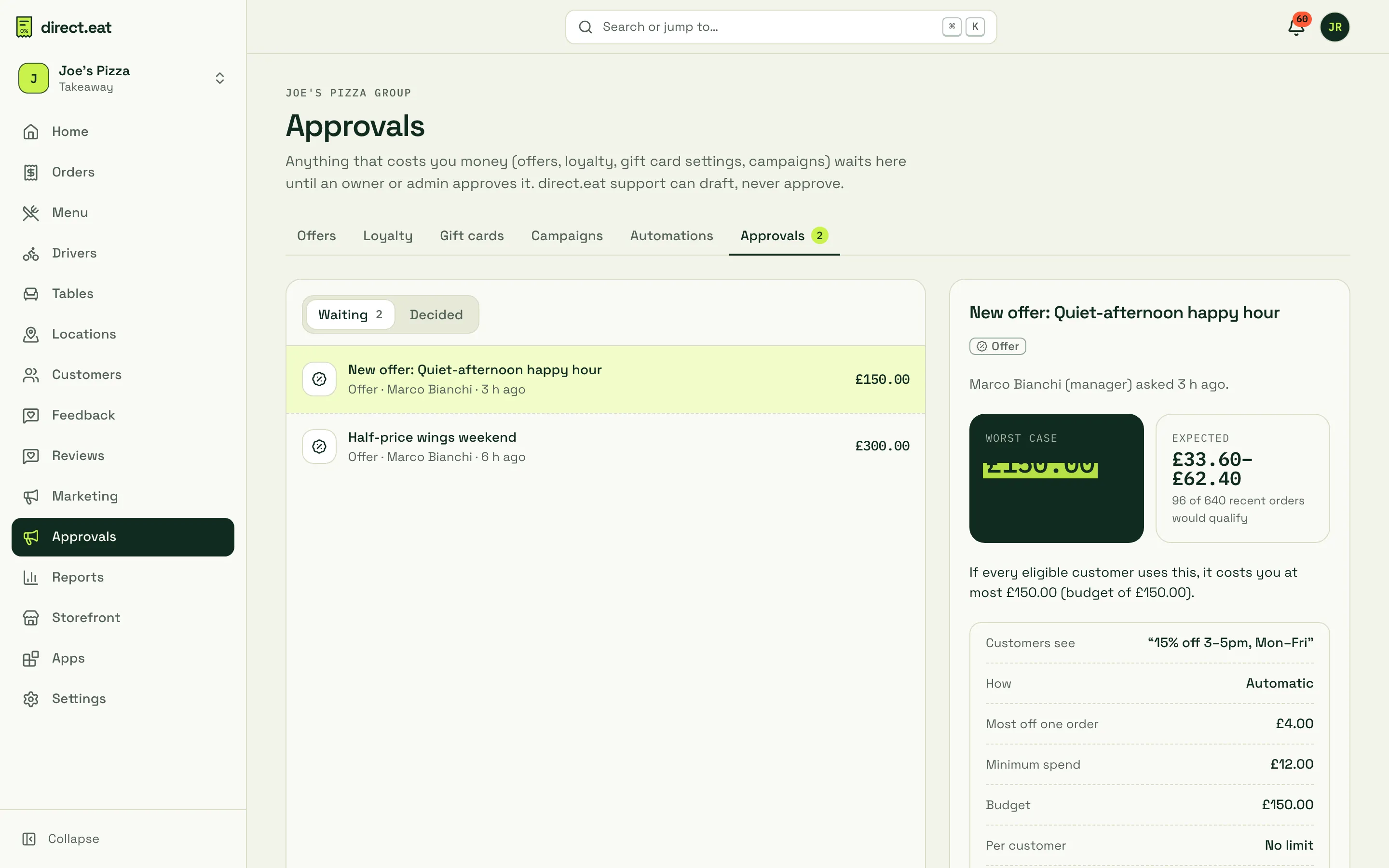
The left column lists requests under Waiting and Decided. Each shows its type, who asked, when, and the worst-case cost. Click one to see the details on the right.
Review a request
Section titled “Review a request”For each request you see:
- Who asked and when, for example “Marco Bianchi (manager) asked 3 h ago”. Requests drafted by direct.eat support carry a Drafted by direct.eat support badge.
- Worst case: the most it can cost you if every eligible customer uses it, capped by its budget. For a loyalty programme this is the monthly cost.
- Expected: a range based on your recent orders, for example “96 of 640 recent orders would qualify”.
- The facts: what customers see, how it’s applied, the most off one order, minimum spend, budget, limit per customer, times and end date.
- Open the full …: jump to the offer or campaign itself.
- High-risk settings, if any, in a yellow warning box.
Approve or send back
Section titled “Approve or send back”-
Read the worst case and the facts.
-
If the request has high-risk settings, type the phrase shown (usually
CONFIRM; for big discounts it’s the discount, like60 OFF) into Type … to approve. -
Click Approve. It goes live straight away, for example “Approved: Quiet-afternoon happy hour is live”.
To say no, click Send back, write What needs changing? and click Send back again. The person who asked sees your note on the offer, changes it and sends it again.
If a request needs the owner and you’re an admin, you’ll see “This one needs the owner: the worst case is above the admin limit.” The owner sees it in their inbox.
After a decision
Section titled “After a decision”Decided requests move to the Decided tab with who decided, when, and any note. Approvals and send-backs are recorded in the activity log.
Changing an approved offer sends a new request, titled “Change to …”.
- Set a budget on every offer. It caps the worst case and makes approval quicker.
- Check Expected against your margins, not just the worst case.
- If you approve a lot of similar requests, talk to your manager about a standard offer you can reuse.
Related
Section titled “Related”Was this page helpful?