

Privacy requests and complaints
You decide how your shop uses its customers’ data (you’re the controller); direct.eat looks after it on your instructions (we’re the processor). When a customer asks for a copy of their data, or for it to be deleted or corrected, you have one month to answer. Privacy requests in the sidebar has everything you need.
Who can do this: owners and admins (permission privacy.manage). Only owners and admins can export a customer’s data.
How requests arrive
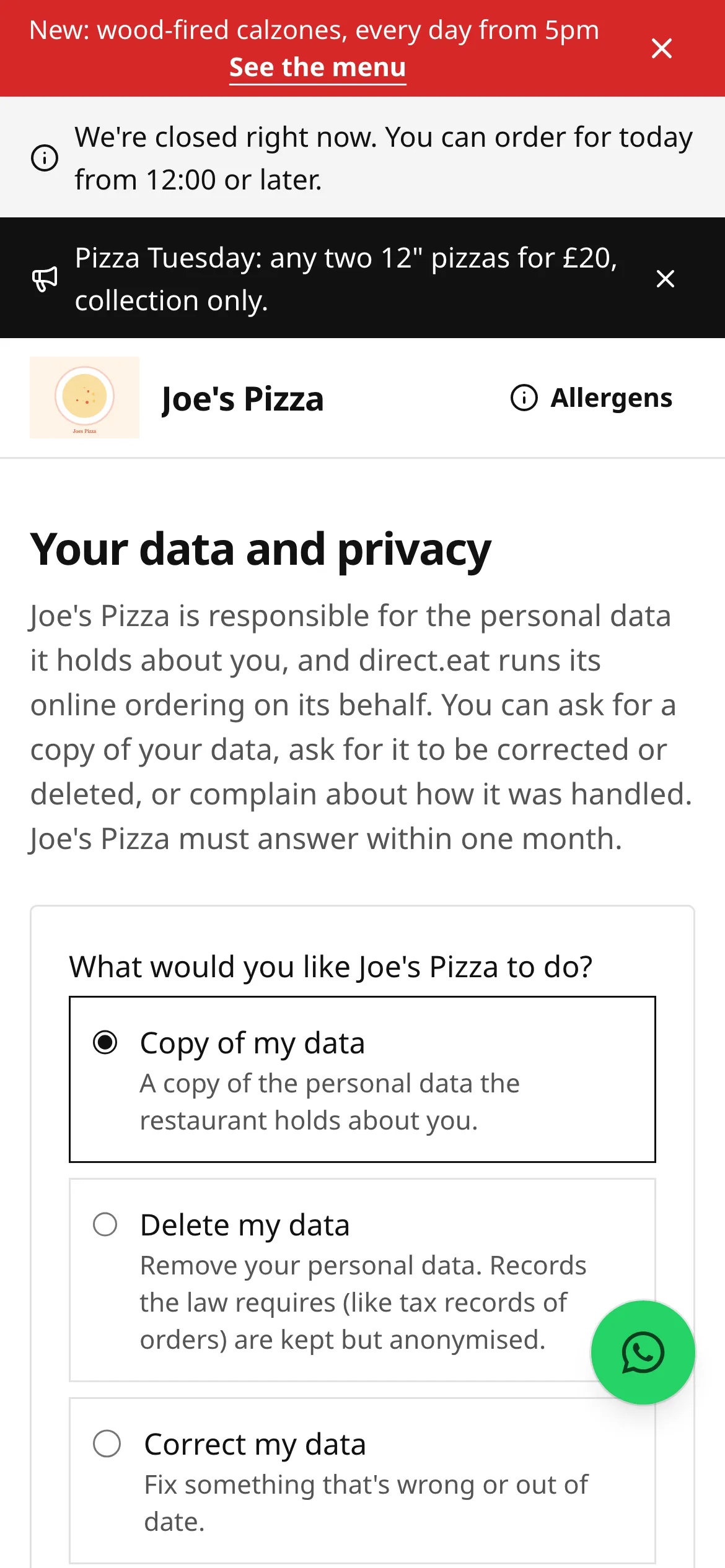
Section titled “How requests arrive”- From your storefront. Every storefront footer has Your data and privacy, which opens
/privacy-request. The customer picks what they want (Copy of my data, Delete my data, Correct my data, Stop using my data, Move my data or a complaint), enters their email and confirms from a link we email them. Only then does the request reach you, with the email already confirmed. - From their account. Signed-in customers can ask from Your data and privacy on their account page (
/account/privacy), where they also see the status of their requests. - By phone, email or in person. Click Log a request so the clock is tracked.
When a request arrives, owners and admins get an email and it appears in the queue.
The queue
Section titled “The queue”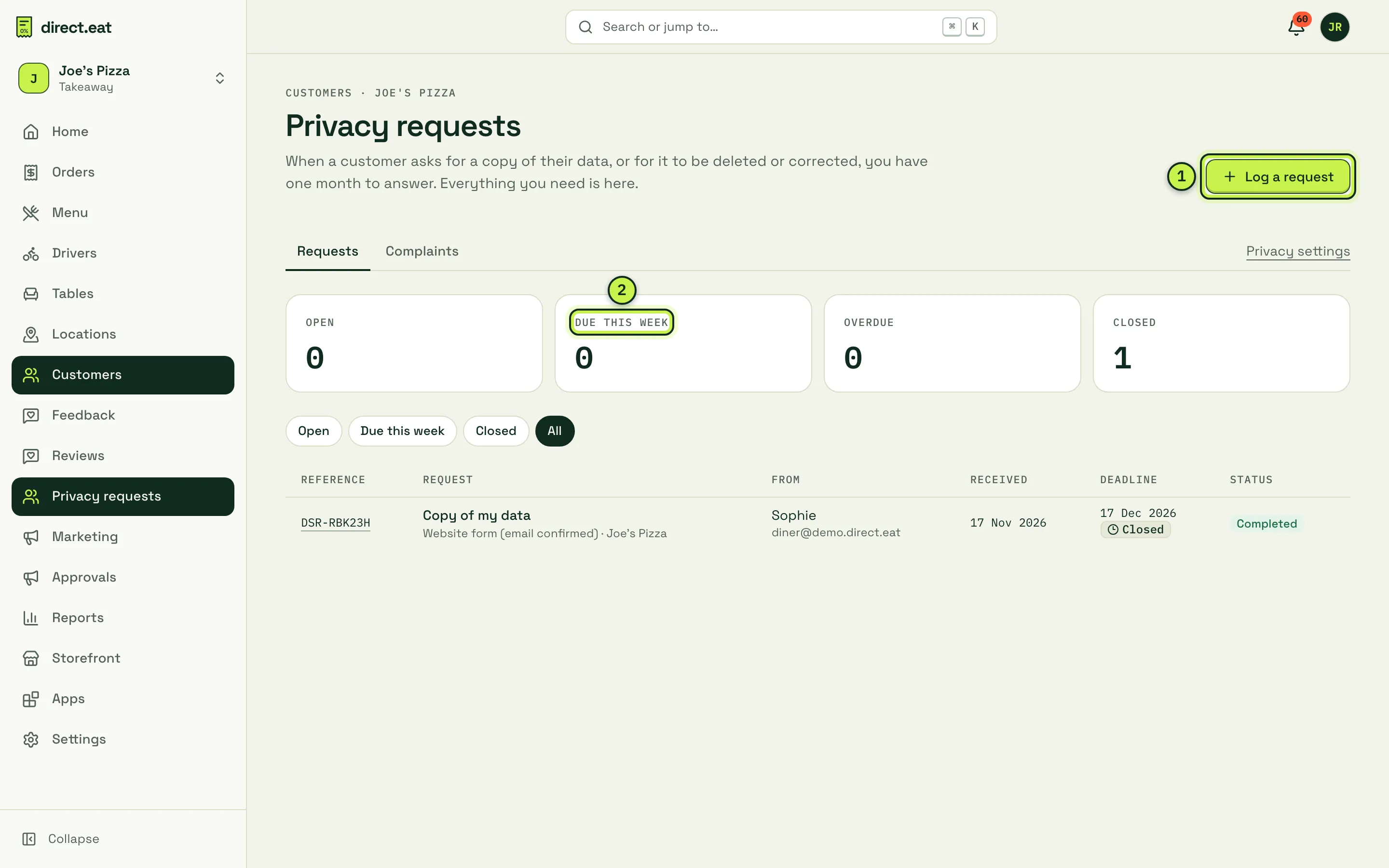
- Log a request: for requests made by phone, email, letter or in person.
- Open, Due this week, Overdue and Closed counts, with filters underneath.
Each request has a reference (DSR-…) and a Deadline: one calendar month from receipt, moved past weekends and bank holidays. We remind owners and admins on day 21 and day 28, and an overdue request is flagged in red.
Answer a request
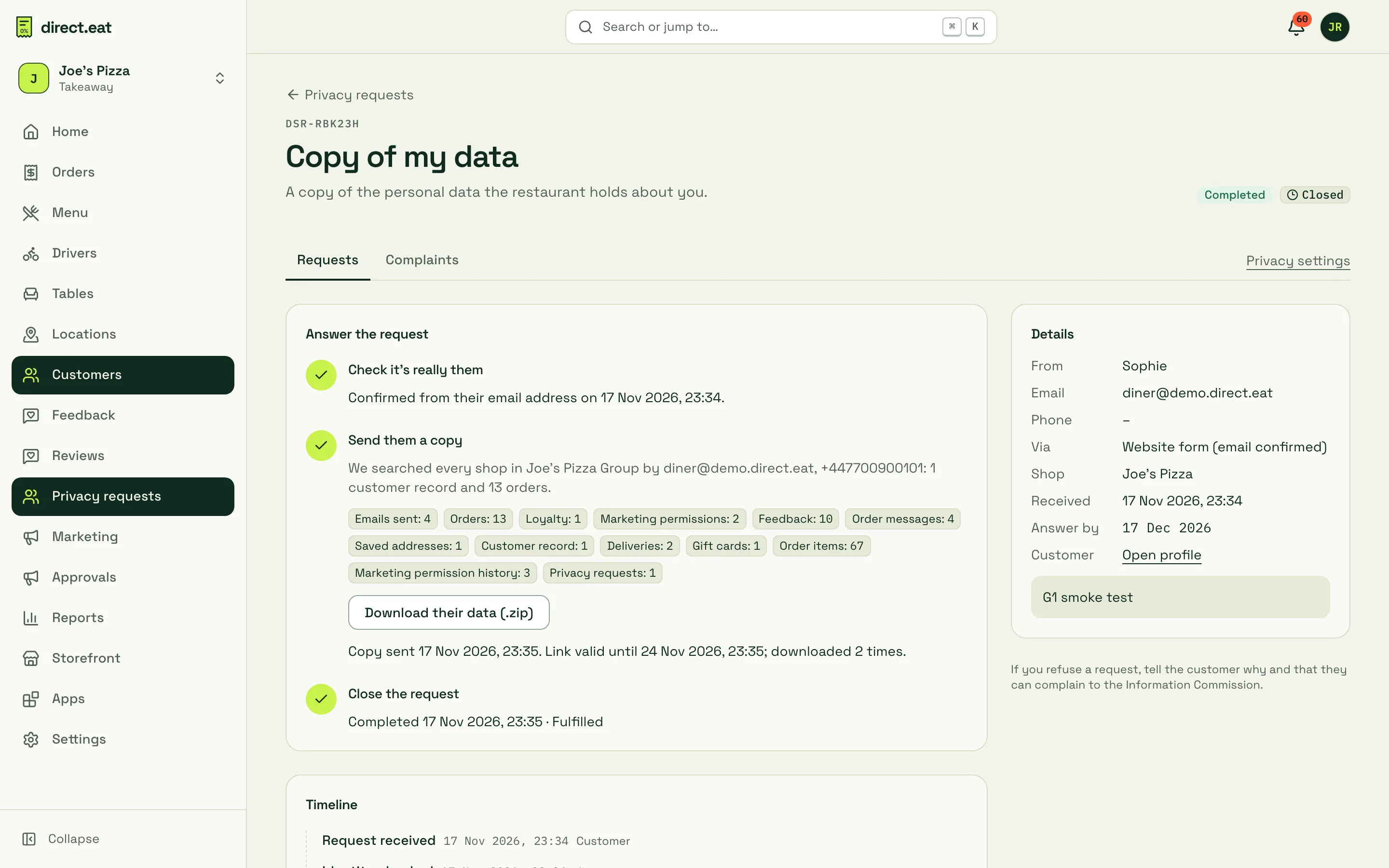
Section titled “Answer a request”Open a request. The page walks you through three steps.
-
Check it’s really them. Requests from your storefront are already confirmed by email. For others, check their identity (for example, they replied from the email on their orders), then click I’ve checked it’s them. You can’t download or send anything before this.
-
Review their data and act. We search every shop in your organisation for their email and phone and show what we found (orders, messages, loyalty, gift cards, marketing permissions and so on). Then:
- Copy or move: Download their data (.zip) (a readable file plus a spreadsheet per section), or Send them a copy, which emails a link that works for 7 days.
- Delete: Erase their personal data… and type to confirm. Their name, contact details, addresses, notes and marketing permissions are removed across your shops. Orders, amounts and VAT stay for your tax records, anonymised. They’re added to a do-not-contact list so they’re never emailed marketing again.
- Correct: fix the details on the customer’s profile (Open profile).
-
Close the request with the outcome. The customer is emailed.
If you need more information from the customer, use Stop the clock and restart it when they reply. For complex requests you can Extend deadline once, by one or two months, within the first month; the customer is told. If you refuse a request, say why: the reason is sent to them along with their right to complain to the Information Commission.
Data-protection complaints
Section titled “Data-protection complaints”Complaints (next to Requests) lists complaints about how you use customers’ data. The law requires you to acknowledge a complaint within 30 days; online complaints are acknowledged automatically. Mark as investigating, then Send response with the outcome, and Close complaint. Use Log a complaint for ones made by phone or letter.
Settings → Privacy and data protection
Section titled “Settings → Privacy and data protection”- Your agreements with direct.eat: the merchant terms of service and the data processing agreement (UK GDPR Article 28), each versioned. When a new version arrives, read it and tick to accept.
- Who does what: what you’re responsible for as controller and what direct.eat does as processor.
- How long data is kept (the same schedule as Data processing) and Sub-processors.
- A form to complain about how direct.eat handles your data (Send complaint to direct.eat), and Your complaints.
Your own login’s data is under Your account and data in the account menu: Download my data and Delete your login.
Cookies on your storefront
Section titled “Cookies on your storefront”Storefronts set no non-essential cookies and no third-party trackers, so there’s no cookie banner:
- Which flyer, QR code or campaign link brought a diner is kept in that browser tab’s temporary storage and saved only with their order.
- Visit counts are cookie-free. Don’t count my visit in your storefront footer lets a diner opt out, and browsers that send Global Privacy Control or Do Not Track are never counted.
- The only cookies are the essential ones: the diner’s sign-in, a table session for table ordering, and Stripe’s fraud protection on the payment step.
Related
Section titled “Related”- Data processing: retention, sub-processors and your duties as controller
- Customers and segments
- Your account (for diners)
Was this page helpful?