

Payments
Diners pay you through Stripe. You get your own Stripe account, Stripe pays your takings straight into your bank, and Stripe charges you its standard card fee. direct.eat takes 0% of every order: no commission, no per-order fee, and no fee for your customers. We never hold your money.
Rough time: 8 to 10 minutes of form-filling, then Stripe checks your details on its side. Who can do this: the owner (or an admin with payment settings permission).
Have these ready
Section titled “Have these ready”Stripe has to check you’re you, because they pay you directly:
- Photo ID (passport or driving licence)
- Bank sort code and account number
- Companies House number, if you’re a limited company
- Home address of the person in charge
Connect Stripe
Section titled “Connect Stripe”-
In the setup wizard’s Payments step, press Set up card payments. (Later: Settings → Payments.)
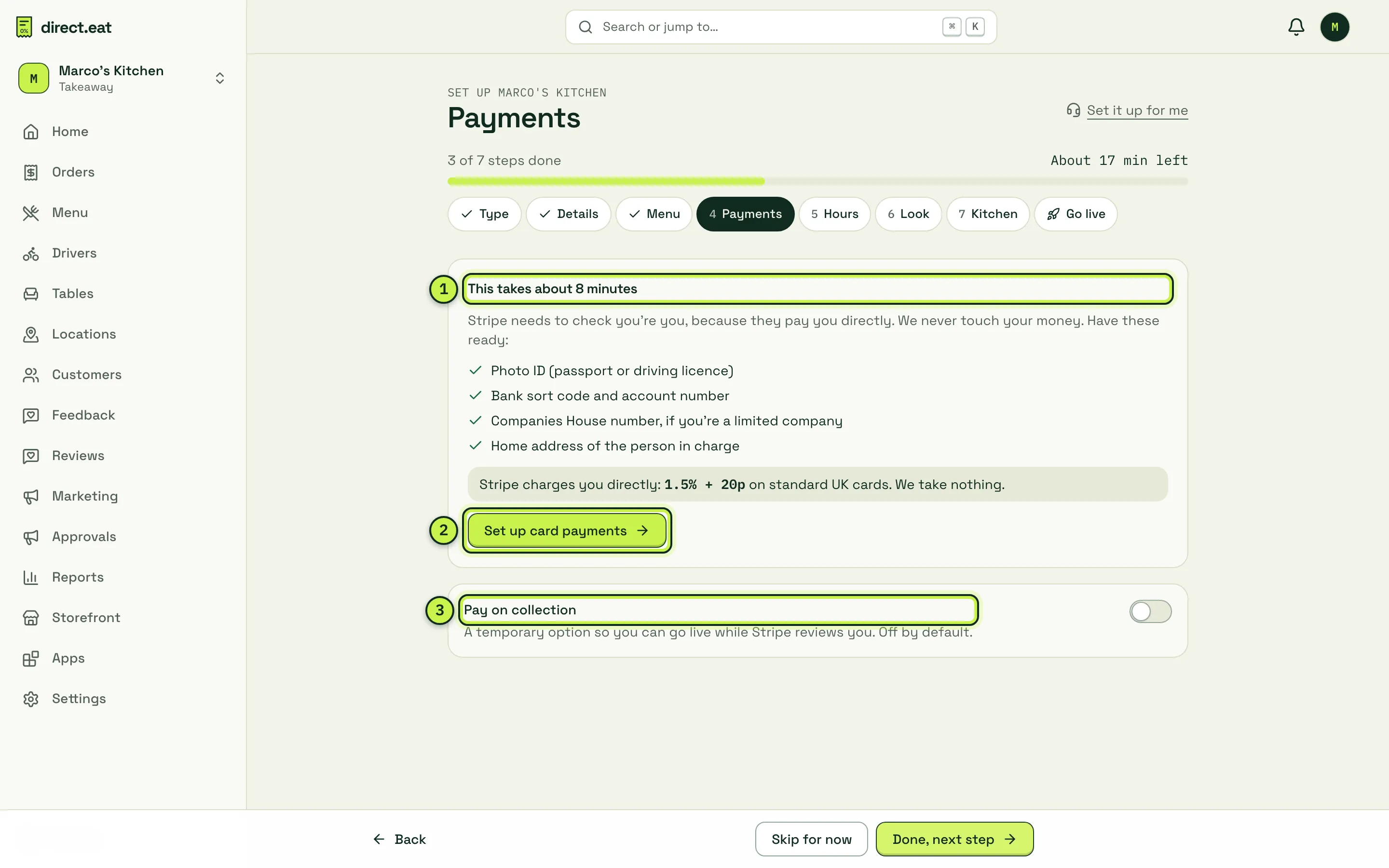
- What to have ready, and Stripe’s fee: 1.5% + 20p on standard UK cards.
- Set up card payments: opens Settings → Payments.
- Pay on collection: a temporary fallback while Stripe reviews you (see below).
-
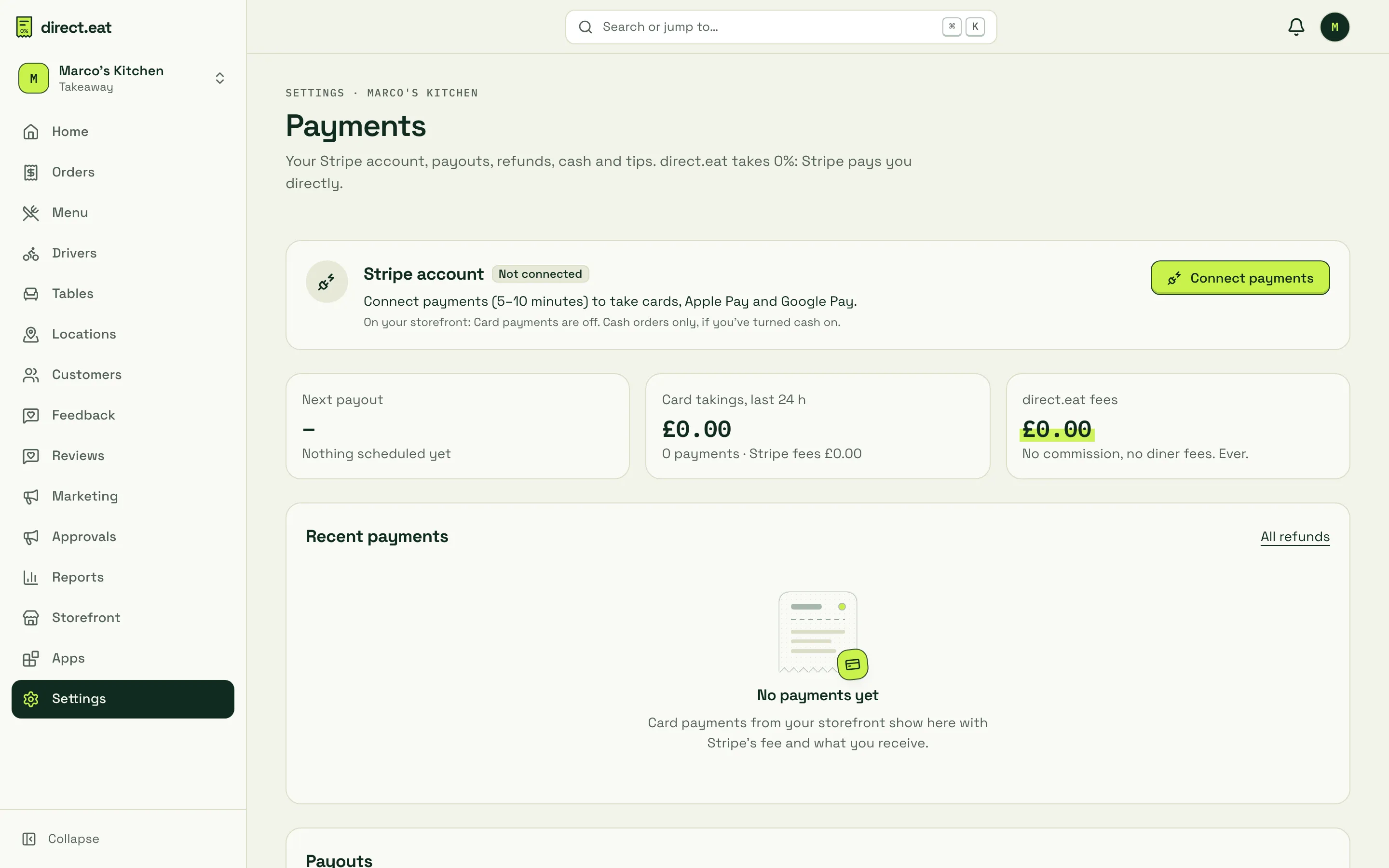
On Settings → Payments, the Stripe account card says Not connected. Press Connect payments.
-
Stripe asks for your business, identity and bank details. Fill them in and you come back to direct.eat.
-
The card now says In review: “Stripe is checking your details.” Card payments switch on as soon as Stripe approves you.

-
When Stripe approves you, the card says Active: “You’re taking card and wallet payments. Stripe pays out to your bank.”
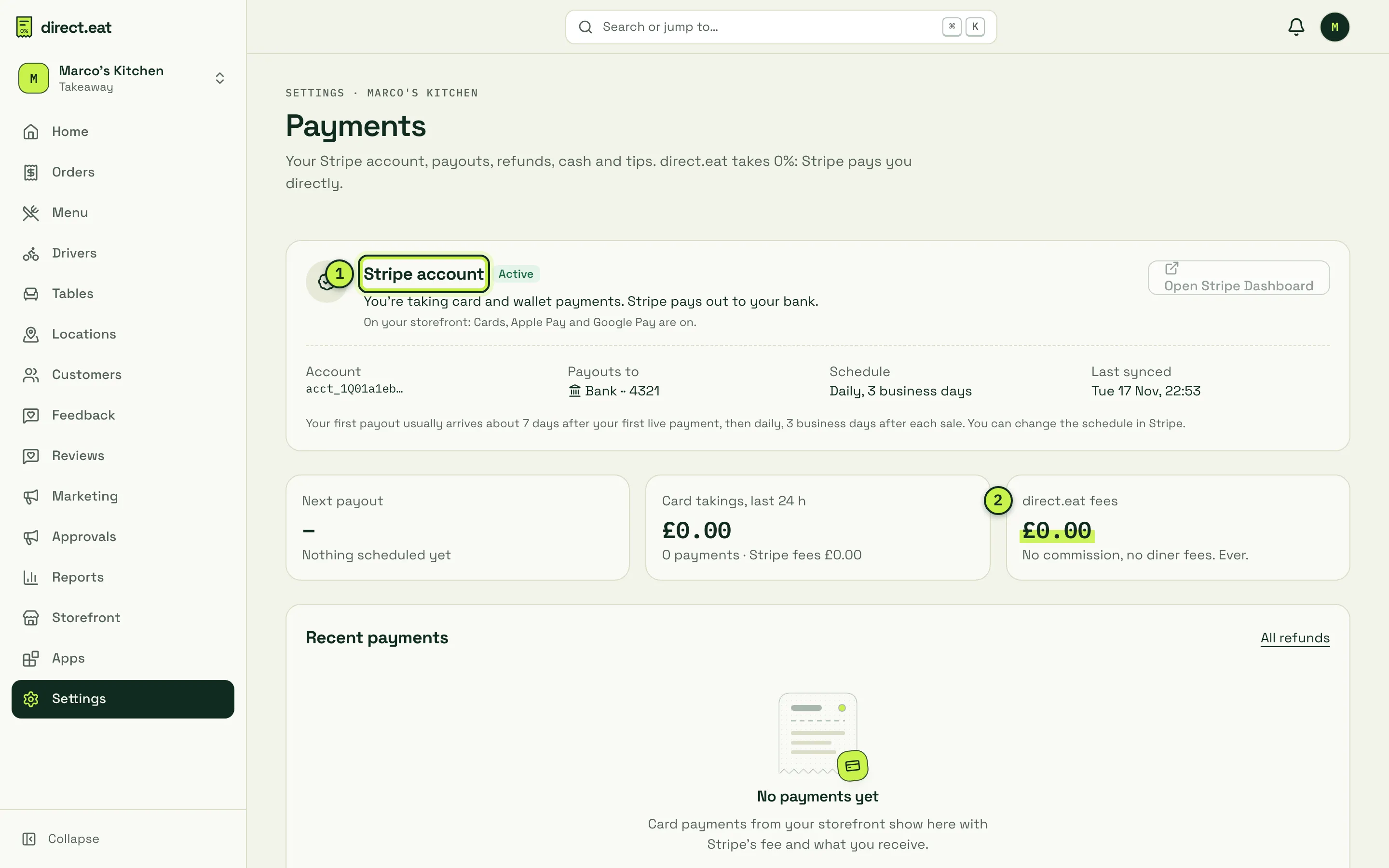
- Stripe account: its state, where payouts go (Bank ·· 4321), the payout Schedule and Open Stripe Dashboard, where you manage your Stripe account itself.
- direct.eat fees: always £0.00. “No commission, no diner fees. Ever.”
Your first payout usually arrives about 7 days after your first live payment, then daily, 3 business days after each sale. You can change the schedule in Stripe.
The account states
Section titled “The account states”| State | What it means | What diners see |
|---|---|---|
| Not connected | You haven’t started. | Card payments are off. Cash orders only, if you’ve turned cash on. |
| In review | Stripe is checking your details. | Card payments switch on as soon as Stripe approves you. |
| Active | You’re taking card and wallet payments. | Cards, Apple Pay and Google Pay. |
| Action needed | Stripe needs more information before a deadline. Payments are still on. | No change. |
| Restricted | Stripe has paused card payments until the listed details are fixed. | Cash only, or “Online payments temporarily unavailable”. |
When Stripe needs something, the card shows exactly what, word for word from Stripe, with a deadline and an Add the details (or Fix now) button. See Payments troubleshooting.
What Stripe charges you
Section titled “What Stripe charges you”Lower down Settings → Payments, What Stripe charges you shows the rates and what you keep on a £25 order. Your actual fee on each order comes from Stripe and is shown against every payment.
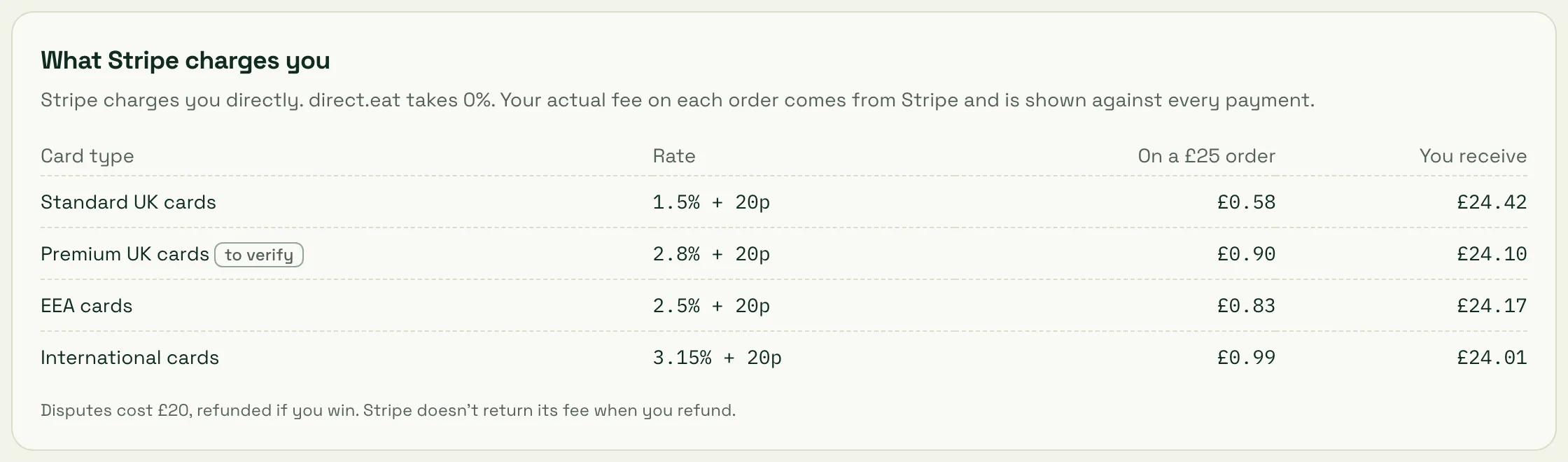
On a £25 order paid with a standard UK card, Stripe’s fee is £0.58 and you receive £24.42. Disputes cost £20, refunded if you win. Stripe doesn’t return its fee when you refund an order.
Pay on collection while you wait
Section titled “Pay on collection while you wait”If you want to go live before Stripe has approved you, switch on Pay on collection in the wizard’s Payments step. Diners can then order and pay when they pick up. It’s off by default and meant to be temporary: cash orders reach the kitchen straight away, so there’s a risk of no-shows.
The go-live checklist item is “Card payments active, or pay on collection switched on”, so either one lets you go live.
Cash, tips and refund limits
Section titled “Cash, tips and refund limits”The rest of Settings → Payments sets how you handle money day to day. You can leave all of it on the defaults for now.
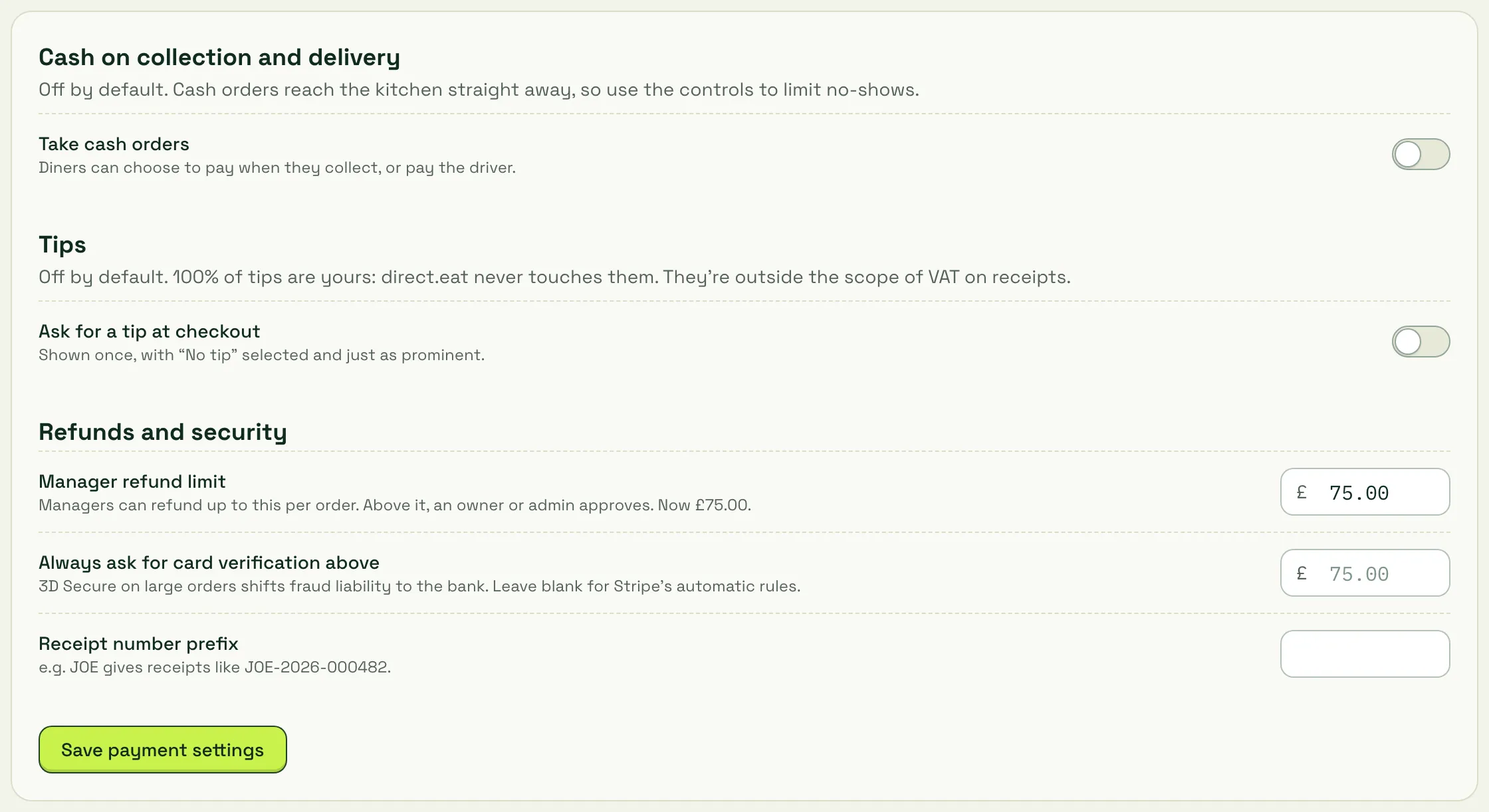
- Take cash orders: off by default. Diners can choose to pay when they collect, or pay the driver.
- Ask for a tip at checkout: off by default. Shown once, with “No tip” selected and just as prominent. 100% of tips are yours.
- Manager refund limit: managers can refund up to this per order (£75.00 by default); above it, an owner or admin approves.
- Always ask for card verification above: 3D Secure on large orders shifts fraud liability to the bank. Leave blank for Stripe’s automatic rules.
- Receipt number prefix: for example JOE gives receipts like JOE-2026-000482.
Press Save payment settings after changing anything.
Related
Section titled “Related”- Delays and refunds
- Reports: payouts and VAT
- Payments troubleshooting
Next step
Section titled “Next step”7. Hours, prep times and slots: tell diners when you’re open and how long food takes.
Was this page helpful?